WhatsApp Customer Support Automation with CrewAI + Twilio
Transform your customer support with AI-powered multi-agent automation. Reduce costs by 98% while maintaining 24/7 availability and consistent quality.
Key Benefits
Instant Response
Responses in under 2 seconds, 24/7 availability
Multi-Agent Intelligence
Specialized agents for support and quality assurance
98% Cost Reduction
From $25 to $0.50 per customer interaction
Unlimited Scalability
Handle any volume without additional staffing
Easy Integration
Works with existing CRM, knowledge base, and ticketing systems
Consistent Quality
Every response reviewed by QA agent before sending
System Architecture
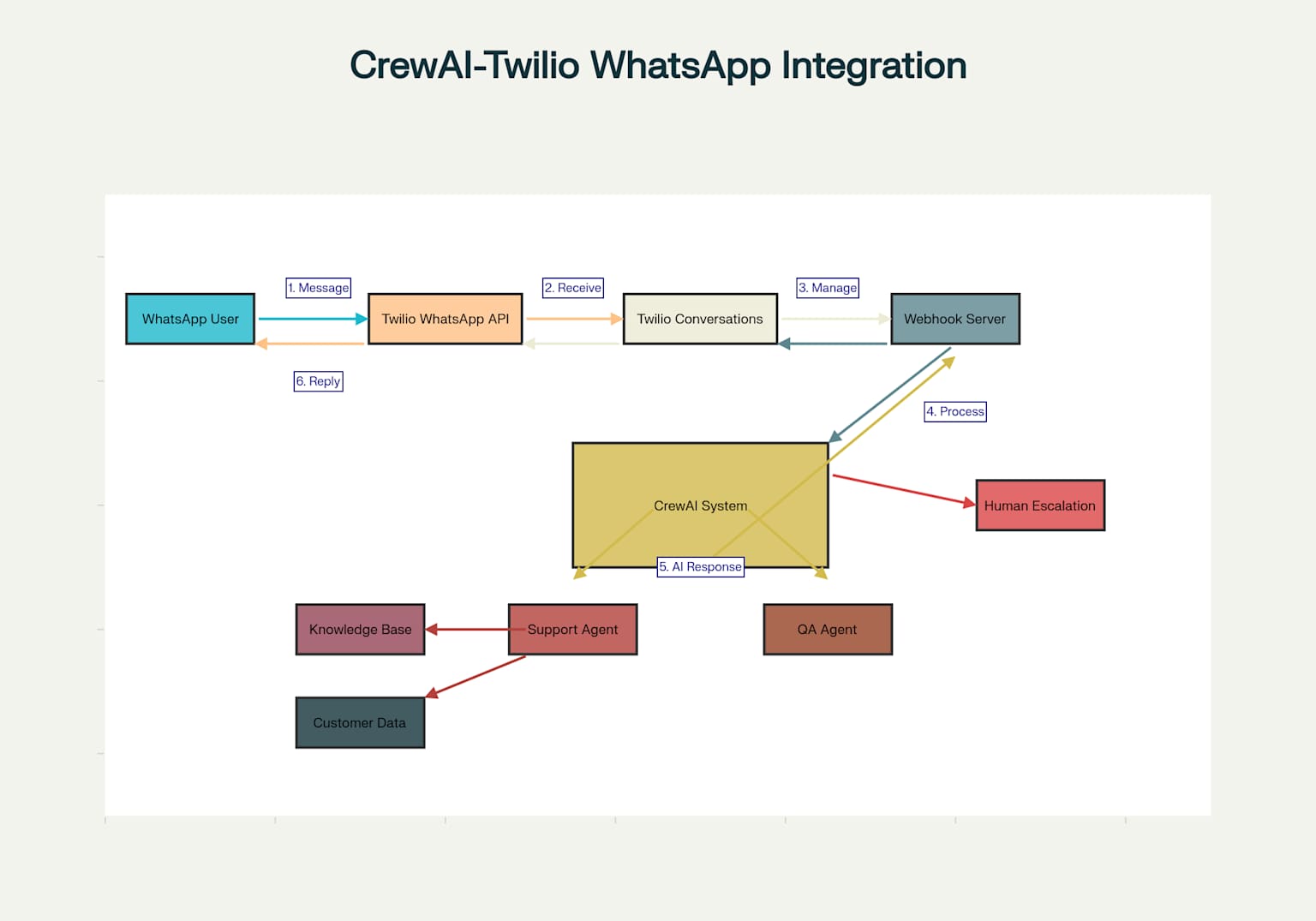
How It Works
- Customer sends message via WhatsApp
- Twilio Conversations API receives and forwards message
- CrewAI Support Agent analyzes and crafts response
- QA Agent reviews response for quality and accuracy
- Approved response sent back to customer
- Escalation to human agents when needed
Live Demo Simulator
Try different customer service scenarios to see the AI agents in action
Demo Scenarios
WhatsApp Business
AI Agents OnlineAgent Process
Support Agent
Analyzing customer request...
QA Agent
Reviewing response quality...
Response
Sending to customer...
Configuration Panel
Mock configuration settings for Twilio and CrewAI integration
Twilio Configuration Loading...
CrewAI Agents
Support Agent
Role: Customer Support Specialist
Goal: Provide helpful and accurate customer support responses
QA Agent
Role: Quality Assurance Reviewer
Goal: Review and improve response quality before sending
Tools & Integration
Customer Data Tool
Access customer orders, history, and preferences
Knowledge Base
Company policies, FAQ, and product information
Escalation Tool
Route complex issues to human agents
Environment Variables Loading...
OPENAI_API_KEY=Loading...
TWILIO_ACCOUNT_SID=Loading...
TWILIO_AUTH_TOKEN=Loading...
TAVILY_API_KEY=Loading...
FLASK_ENV=production
Analytics Dashboard
Performance metrics and insights from your AI customer support system
Cost Comparison
System Status
Recent Conversations
Loading conversation history...
Setup Guide
Get your WhatsApp customer support automation running in under 2 hours
Twilio Setup
Create Twilio account and configure WhatsApp Business API
CrewAI Configuration
Set up AI agents and customize for your business
Webhook Integration
Deploy Flask server and configure webhooks
Testing & Launch
Test the integration and go live